
Back In Stock Wizard for BigCommerce Troubleshooting and FAQ
Troubleshooting and FAQ
The form isn't showing on my product pages
Check each of these:
- Your sending domain is verified in Settings → Mail Settings. The form stays off until it is. See Verify your sending domain.
- The form is turned on with Enable Back in Stock in the top bar, or on the right storefronts if you use Multi-Storefront. See Turning on the back in stock form.
- The product, or the variant the shopper chose, is out of stock. The form only shows for sold-out items.
- If Wait for the shopper to choose a variant is on, the form appears only once a sold-out variant is picked.
Then click Clear Storefront Cache (the circular-arrows icon in the top bar) and reload the product page.
Shoppers aren't getting the back in stock email
- Check your sending domain is still verified in Mail Settings. If a domain is removed, emails stop until one is verified again.
- If you use Minimum Inventory Threshold, emails wait until the stock clears your level.
- If you use Notifications to Inventory Percentage, only some waiting shoppers are emailed, those who signed up first.
- Look the shopper up in Subscribers → Subscriber History to see whether the email was sent, and Events to see whether it bounced.
See Features for the two inventory features.
How does the app know a product is back in stock?
BigCommerce notifies the app whenever a product or its stock changes, and the app also re-checks your products regularly. When a product someone is waiting for is back, the email goes out.
How do shoppers unsubscribe?
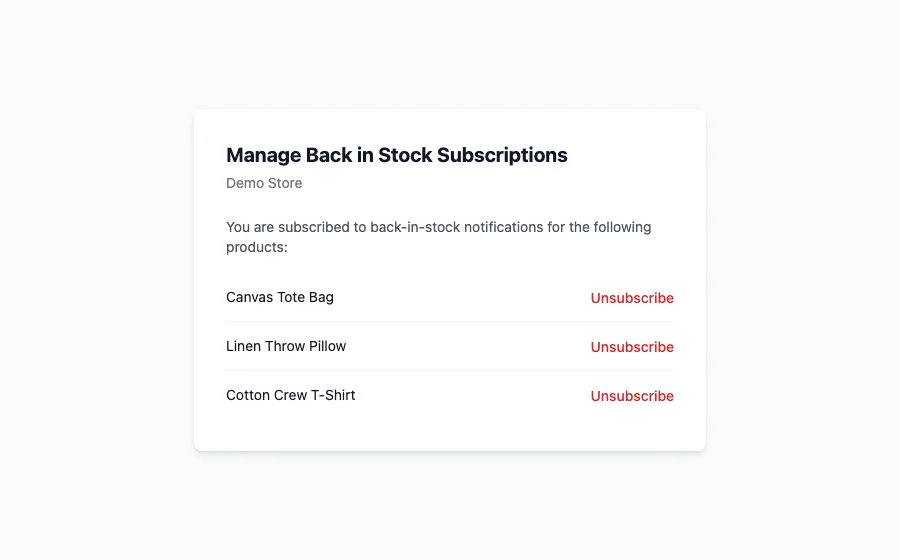
Turn on Show Manage Subscriptions Link in Email Template. The link opens a Manage Back in Stock Subscriptions page listing the shopper's products, each with an Unsubscribe button.
Does turning the form off delete my subscribers?
No. Existing subscriptions are kept, and those shoppers are still emailed when the product is back.
I can't import subscribers
Imports need a verified sending domain, and the file must be a CSV of up to 5 MB and 10,000 rows. See Importing and exporting subscribers.
How do I cancel?
Uninstall Back In Stock Wizard from your BigCommerce store.
Where can I get more help?
Use Support → Contact Us in the app, or email us at help@yourstorewizards.com.