
Back In Stock Wizard for Shopify Troubleshooting and FAQ
Troubleshooting and FAQ
The form isn't showing on my product pages
Check each of these:
- Your sending domain is verified in Settings → Mail Settings. The form stays off until it is. See Verify your sending domain.
- The Back in Stock app block is on your product template and verified, or the legacy install is active. See Turning on the back in stock form.
- The product, or the variant the shopper chose, is out of stock. The form only shows for sold-out items.
- If Wait for the shopper to choose a variant is on, the form appears only once a sold-out variant is picked.
Then click Clear Storefront Cache (the circular-arrows icon in the top bar) and reload the product page.
Shoppers aren't getting the back in stock email
- Check your sending domain is still verified in Mail Settings. If a domain is removed, emails stop until one is verified again.
- If you use Minimum Inventory Threshold, emails wait until the stock clears your level.
- If you use Notifications to Inventory Percentage, only some waiting shoppers are emailed, those who signed up first.
- Look the shopper up in Subscribers → Subscriber History to see whether the email was sent, and Events to see whether it bounced.
See Features for the two inventory features.
How does the app know a product is back in stock?
Shopify notifies the app whenever one of your products changes, and the app also re-checks your products regularly. When a product someone is waiting for is back, the email goes out.
How do shoppers unsubscribe?
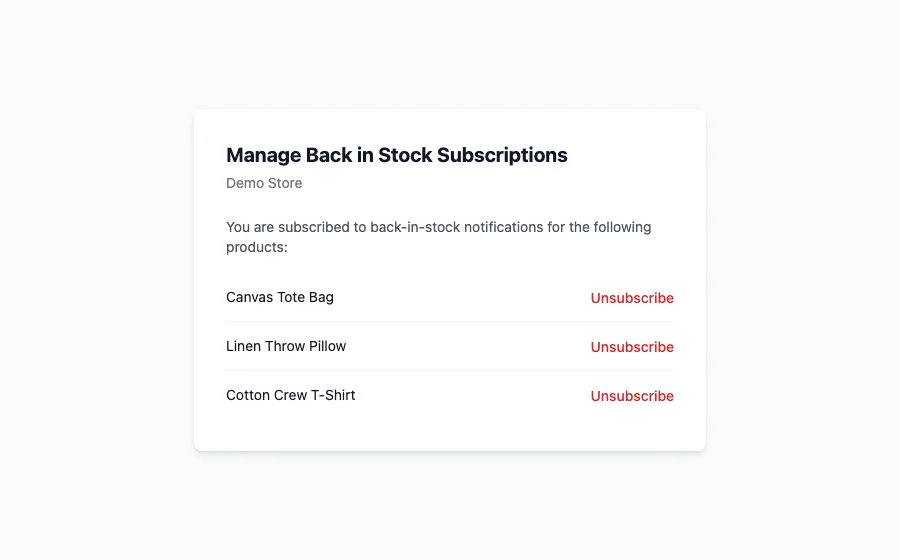
Turn on Show Manage Subscriptions Link in Email Template. The link opens a Manage Back in Stock Subscriptions page listing the shopper's products, each with an Unsubscribe button.
I can't import subscribers
Imports need a verified sending domain, and the file must be a CSV of up to 5 MB and 10,000 rows. See Importing and exporting subscribers.
How do I cancel?
In your Shopify admin, go to Settings → Apps and sales channels → Back In Stock Wizard. If you cancel, you'll be asked to approve a new subscription before you can use the app again.
Where can I get more help?
Use Support → Contact Us in the app, or email us at help@yourstorewizards.com.