
The Shopify app
What it does
The Your Store Tools Shopify app puts your tools right inside your Shopify admin. Install it from the Shopify App Store and approve its access, and you're connected: there are no API keys to copy and no separate password. Whenever you open the app from Shopify, you're signed in.
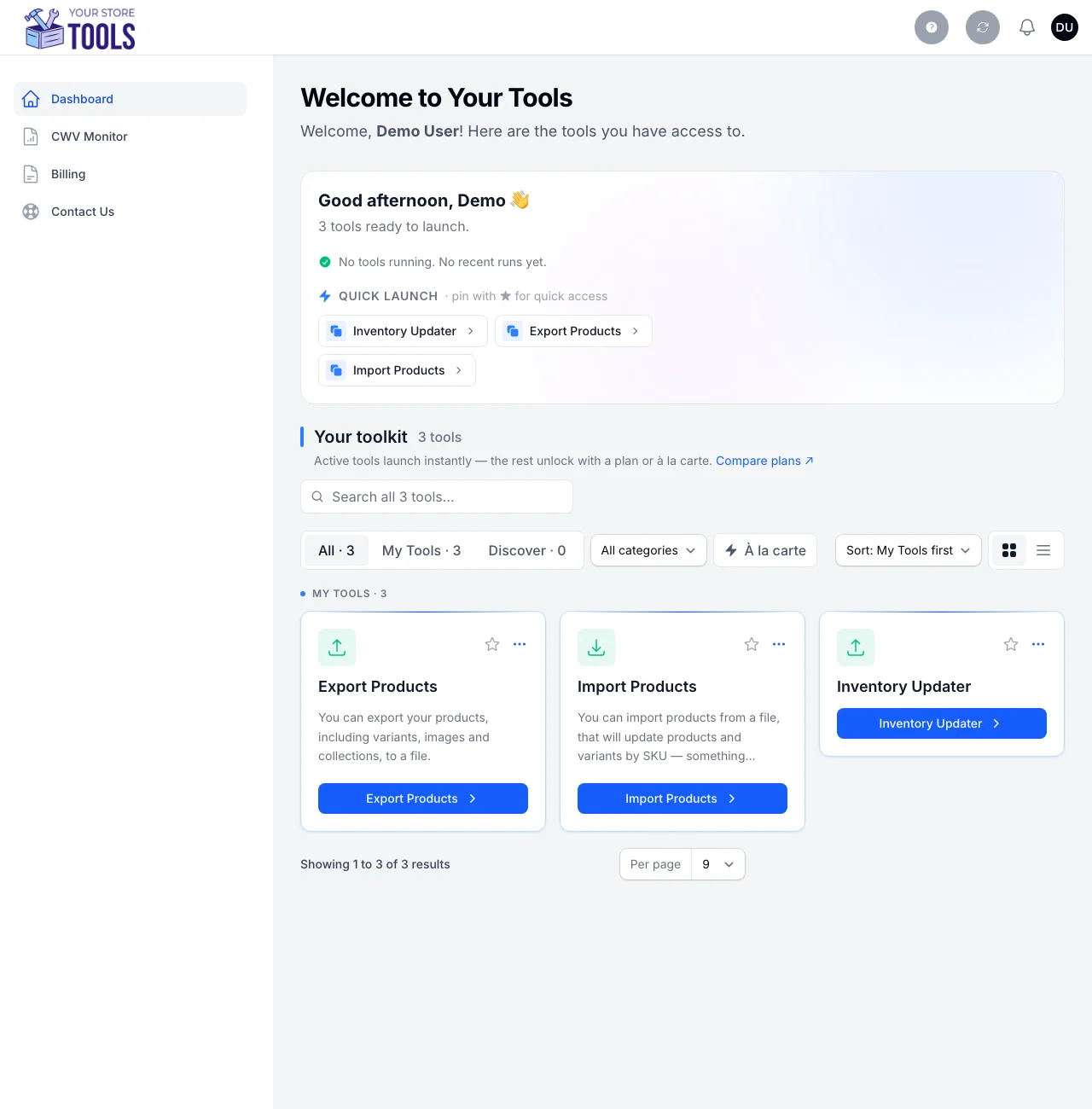
The app shows the same toolkit as the Your Store Tools dashboard, with every Shopify tool, plus Core Web Vitals reports for your storefront, billing and support.
Before you start
- Sign in to your Shopify admin as the store owner, or a staff member allowed to install apps.
- Your plan is billed through Shopify, on your Shopify invoice.
Step-by-step
-
Install the app. Install Your Store Tools from the Shopify App Store and approve the access it asks for. Shopify connects your store and opens the app.
-
Open it any time from Apps in your Shopify admin. You're signed in automatically.
-
Use your tools. The app opens on Welcome to Your Tools. Your tools are under Your toolkit: choose a tool's button to open it. See How our tools work for the steps every tool shares.
-
Approve extra access when asked. Some tools need more access than the app asked for at install, for example to read orders or files. The first time you open one, you'll see Additional Permissions Required: choose Authorize and approve the access in Shopify. Tools that work with customer or order information show a Personal Data Notice explaining how that data is used.
Reference
| Menu item | What it's for |
|---|---|
| Dashboard | Your tools. |
| CWV Monitor | Core Web Vitals reports on your storefront's speed and experience. |
| Billing | Your plan and subscription, billed through Shopify. Store owners only. |
| Contact Us | Send us a message from inside the app. |
The ? button at the top opens our help center.
Troubleshooting and FAQ
The app won't load, or says my session expired
Open it again from Apps in your Shopify admin so Shopify can sign you in again.
A tool asks for additional permissions
That tool needs access the app didn't ask for at install. Choose Authorize and approve it in Shopify; the tool can't work without it.
"Subscription Failed"
We couldn't confirm the charge with Shopify. Try again from Billing; if it keeps happening, contact us from Contact Us.
What happens if I uninstall the app?
Your store is disconnected, your paid plan is cancelled, and any extra permissions you approved are removed. Reinstall from the Shopify App Store to start again.
I don't see Billing
Only store owners can see and change billing.